


Problem
Seed has grown from a P2P document publishing tool into a platform where communities and companies build shared knowledge. The current app layout does not make this purpose clear.
Users do not know where to start, what a site contains, or where to find a tool. They lose context when they move between documents, discussions, versions, activity, notifications, people, explore, and agent sessions. Desktop and web also use different interactions for related tasks.
The layout must explain the site, make useful starting points clear, and let users bring in related content without disrupting their main task.
Solution
Use an isolated layout study to choose a common interaction model for desktop, web, and mobile before changing the production apps. Compare two working proposals with the same content and tasks:
Guided: one main reading area, stable site navigation, and one related panel with adjustable width. No document tabs. Breadcrumbs show location. The omnibar shows recent documents before search results.
Flexible: the same starting experience, with docked panel groups that users can move, split, resize, close, and focus. Tabs identify open content within groups. Provide menu and keyboard controls as alternatives to dragging.
Use Guided as the starting direction. Keep the route to a more flexible workspace open, subject to user testing.
Both proposals include:
A site home that explains its purpose and offers clear starting documents.
Small, labelled cues for comments, discussions, connections, and contributors. Open these when requested; keep the source document visible in related panel headers.
A file browser for the whole site, with a required site name, enough width for deep folders, and retained filter and expansion state. Guided places it in the navigation area; Flexible can dock it beside other panels.
A light visual style with clear hierarchy, quiet controls, and readable documents. Use Paseo as a visual reference.
A shared titlebar with site identity, a desktop omnibar, selected-account avatar, and optional panel shortcuts. Keep experiment controls outside the proposed app layout.
One visible pane on mobile, with an open-panel switcher. Preserve reading position and discussion drafts when changing panels or screen width. Test temporary detail sheets later.
Contextual entry to agents. Flexible also provides an Agents destination.
User stories:
As a new visitor, I can understand the site and find a useful place to start.
As a reader, I can notice related discussion, inspect it, and return to the same place in my document.
As a member, I can start a reply and keep it while I move between views.
As a frequent user, I can return to recent work through the omnibar.
As an advanced user, I can arrange several panels without forcing this setup on new visitors.
Layout screenshots
Captured from the hosted prototype with the same sample document and discussion. Desktop viewports are 1600 × 1000; mobile viewports are 390 × 844. Images use 2× resolution. The small bar at the top is for experiment controls and is not part of the proposed app.
Guided — desktop
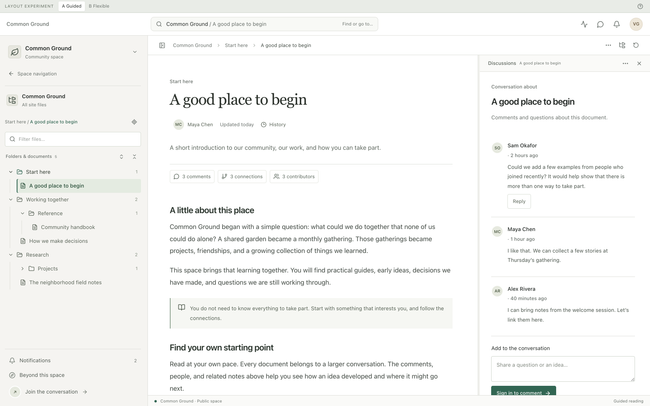
Site files in the wide navigation pane, the document in the main reading area, and its discussion in the related panel. The document has no tabs.
Guided — mobile
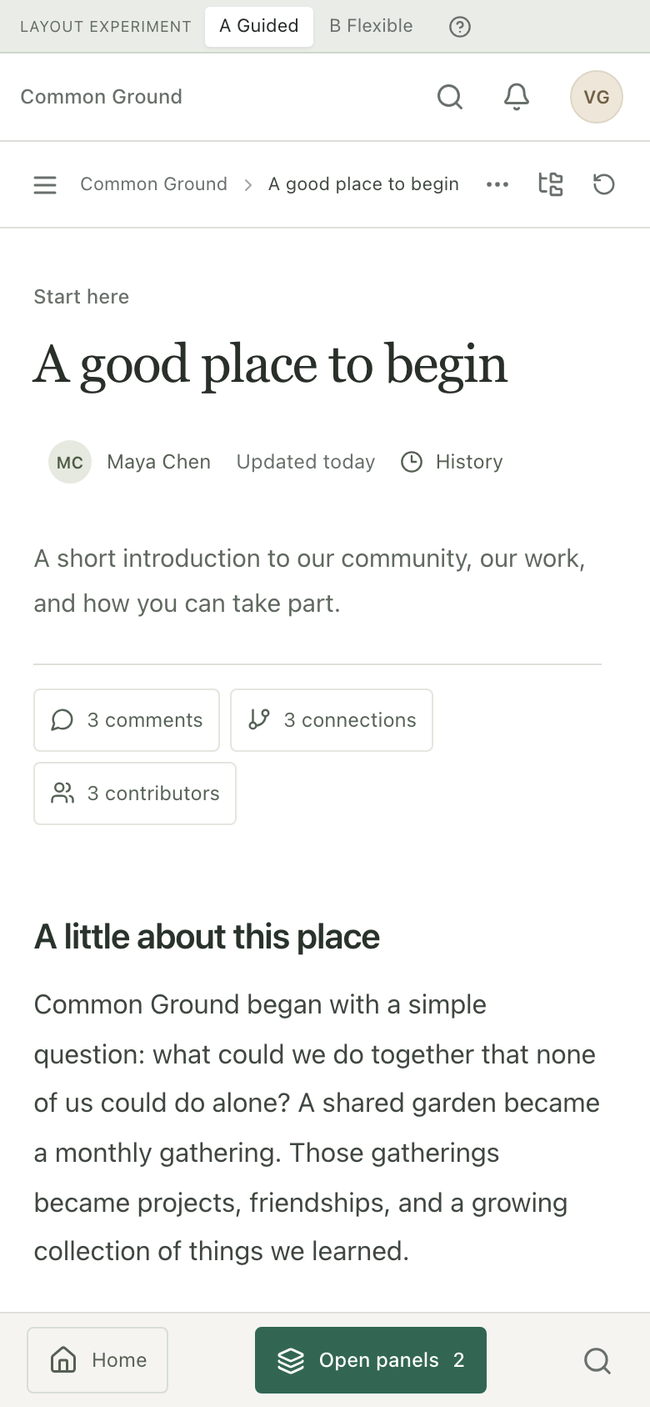
The same document fills the reading area. Comments, connections, and contributors remain visible as cues. Open panels returns to the discussion.
Flexible — desktop
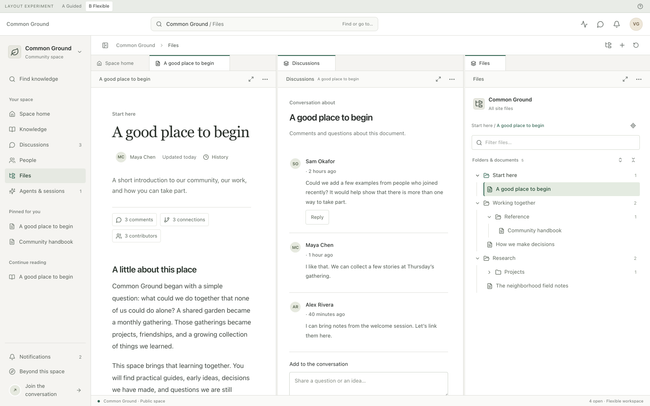
Document, discussion, and site files occupy separate docked groups. Tabs identify open content; dividers and panel actions control the arrangement.
Flexible — mobile
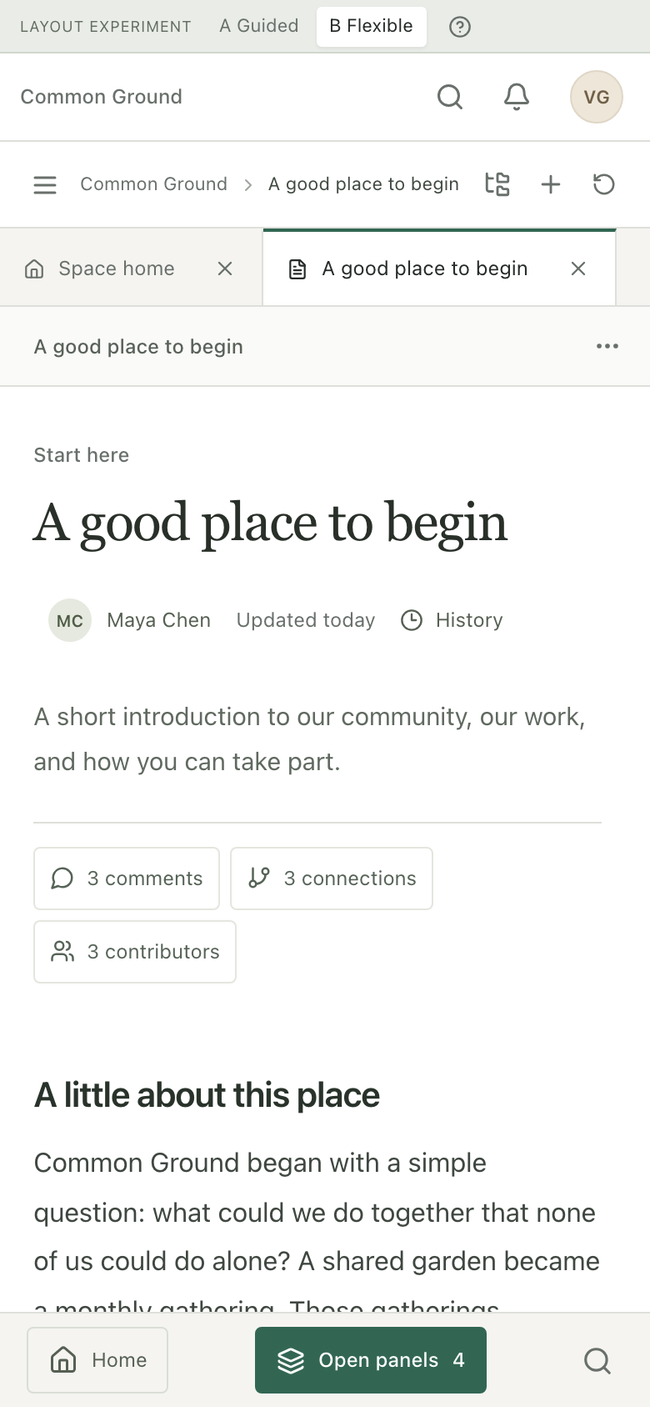
The document is the visible pane. Tabs retain their close controls, and Open panels provides access to the other open content without compressing the desktop grid.
Scope
The isolated React, Vite, and Tailwind prototype is implemented and hosted on Cloudflare Pages. It uses sample content, the installed resizable-panel library, and the shared Seed mobile panel sheet. It does not connect to Seed services. Automated checks cover panel state, draft and reading-position retention, and desktop, tablet, and mobile flows. These checks do not establish usability.
Remaining work is incremental. The estimates below are planning allowances, not delivery commitments:
Prepare comparison tasks — half a day. Define the same visitor, member, and advanced-user tasks for both proposals. Include a deeply nested document, a discussion, and a return to recent work.
Run a small user comparison — one to two days, plus participant scheduling. Record task completion, wrong turns, recovery, and whether people can name the current site and source document. Include phone use.
Revise the preferred proposal — one to two days after comparison. Fix the largest navigation and context problems. Keep changes small enough to compare against the prior version. Run desktop and mobile checks again.
Write the implementation handoff — half to one day after revision. Specify navigation, panel lifecycle, source context, responsive behaviour, keyboard controls, and which existing app state to reuse. Identify desktop/web differences that need a product decision.
Production integration needs a separate estimate after the preferred layout and state rules are agreed. Reuse Seed's existing recent-document storage; do not introduce a second history system.
Rabbit Holes
A general window manager with overlapping windows, arbitrary tiles, or nested docking rules.
Saved layouts across devices before the basic reading and return flows are clear.
Graph views, new knowledge models, or a redesign of comments and discussions during the layout study.
Full agent workflows, identity flows, or access-control simulation beyond what is needed to assess context.
Pixel matching reference apps instead of testing Seed tasks.
Treating automated browser checks as evidence that users understand the interface.
No Gos
Do not change production app code, routes, backend services, or publishing behaviour in this study.
Do not add document tabs to the Guided proposal at this stage.
Do not show every tool and panel by default or require users to arrange a workspace before they can read.
Do not silently change the source of an open related panel when another document is selected.
Do not lose reading position or drafts during navigation, panel changes, or responsive layout changes.
Do not hide the site scope of the file browser or treat it as the device filesystem.
Do not compress a desktop panel grid onto a phone. Use equivalent actions suited to each screen size.
Do not add new production history storage or cross-device layout sync.
Do not use real user content, credentials, publishing, notifications, or live agent calls in the prototype.
Do you like what you are reading? Subscribe to receive updates.
Unsubscribe anytime